
Best POS Systems for Small Restaurants (2026): Chosen by How You Actually Serve
8 restaurant POS systems compared for small, single-site restaurants: real monthly costs at $30k in card sales, kitchen display fees, contract traps and who each one suits.

For most small restaurants, the right POS depends less on features than on how you take orders and how you pay for card processing. Counter-service cafés and takeaways usually do well on Square, starting from $0 a month. Busy table-service restaurants that want purpose-built hardware lean towards Toast or SpotOn. If you want ordering, kitchen display, recipes, stock and the end-of-day cash-up in one browser app on devices you already own, that’s what we built Restaurant POS One for.
Disclosure: Restaurant POS One is our product and we’ve listed it first. We only describe what it does today, and we say where it’s the wrong choice. The other seven are ranked by fit for a single-site restaurant with 20–60 covers, using pricing from each vendor’s own website, checked 29 September 2026.
Start here: which one fits your restaurant?
| If your restaurant is… | Look at first | Why |
|---|---|---|
| Counter service, 1 till, tight budget | Square Free, Loyverse | $0 software; you only pay processing |
| Table service, 30–60 covers, busy weekends | Toast, SpotOn, TouchBistro | Floor plans, coursing, handhelds built for service |
| Kitchen-heavy with food-cost pressure (recipes, stock, suppliers) | Restaurant POS One, Lightspeed Essential | Recipes, purchases and suppliers in the same system as sales |
| Dine-in + takeaway + your own delivery riders | Restaurant POS One | Rider role and delivery assignment built in |
| Café that also sells retail goods | Clover, Square | Strong retail/inventory side |
| Planning a second site within a year | Lightspeed, Toast | Multi-location management on higher tiers |
If you’re running a counter-service café rather than a table-service restaurant, our café POS comparison uses a coffee-shop ticket size instead of this one’s $30 restaurant ticket, which changes which processing fees matter most. Running a bakery instead? Our bakery POS comparison ranks systems by recipe-costing depth rather than table service.
The number most “best POS” lists skip: processing costs more than the software
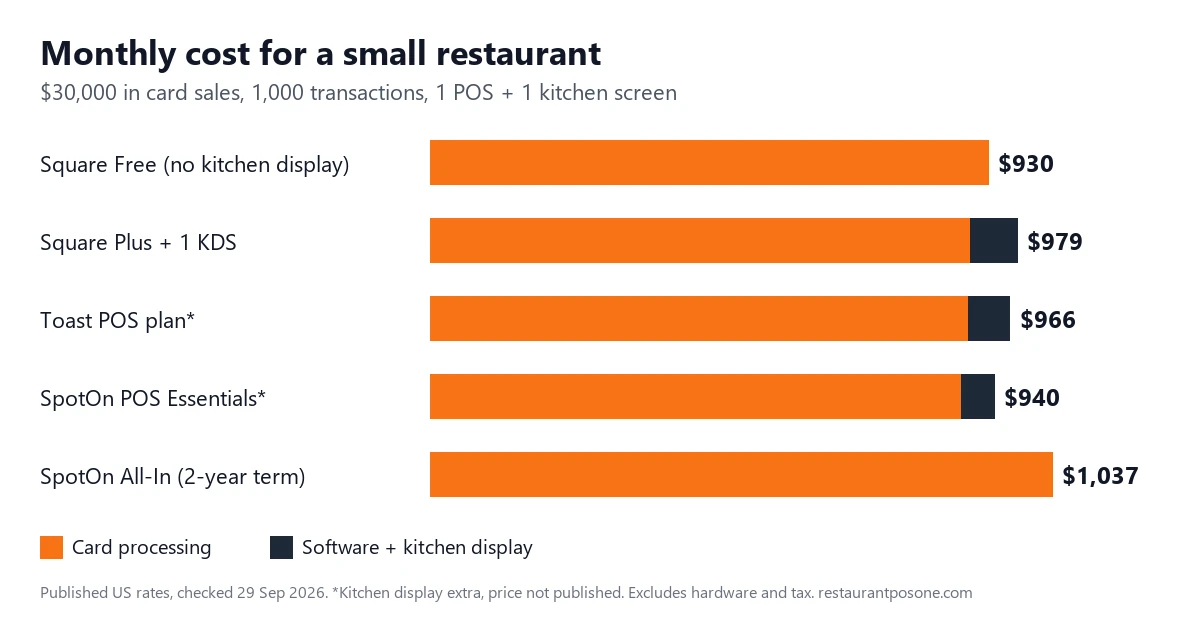
Most comparisons lead with the monthly software fee. For a small restaurant, that’s usually the smaller bill. Take a restaurant with $30,000 a month in card sales across 1,000 transactions (a $30 average ticket), running one POS and one kitchen screen:
| Setup (published US rates) | Software + KDS / month | Card processing / month | Total / month |
|---|---|---|---|
| Square Free (2.6% + 15¢, no KDS) | $0 | $930 | $930 (no kitchen display) |
| Square Plus (2.5% + 15¢, KDS $30/device) | $79 | $900 | $979 |
| Toast Point of Sale plan (2.49% + 15¢) | $69 + KDS* | $897 | $966 + KDS |
| SpotOn POS Essentials (2.45% + 15¢, month-to-month) | $55 + KDS* | $885 | $940 + KDS |
| SpotOn All-In ($0/station, 2.79% + 20¢, 2-year term) | $0 | $1,037 | $1,037 |
*Kitchen display pricing for Toast and SpotOn isn’t on their public pricing pages, so ask for it in writing.
Three things stand out:
- A 0.1% difference in processing rate is $30 a month at this volume, as much as some software plans. Compare rates before subscription fees.
- “$0 a month” plans often cost more. SpotOn’s All-In plan saves $55 in software but costs $152 more in processing, and it locks you in for two years.
- The 15¢ vs 20¢ per-transaction fee matters for cafés. At a $6 average ticket, the fixed fee is 2.5–3.3% of every sale on its own. Low-ticket businesses should push hardest on the per-transaction fee.
Hardware, taxes, add-ons, chargebacks and keyed-in card rates come on top of this. It’s a comparison baseline, not a quote.
The 8 best POS systems for small restaurants
1. Restaurant POS One — one browser app from order to cash-up
Pricing: $49/month.
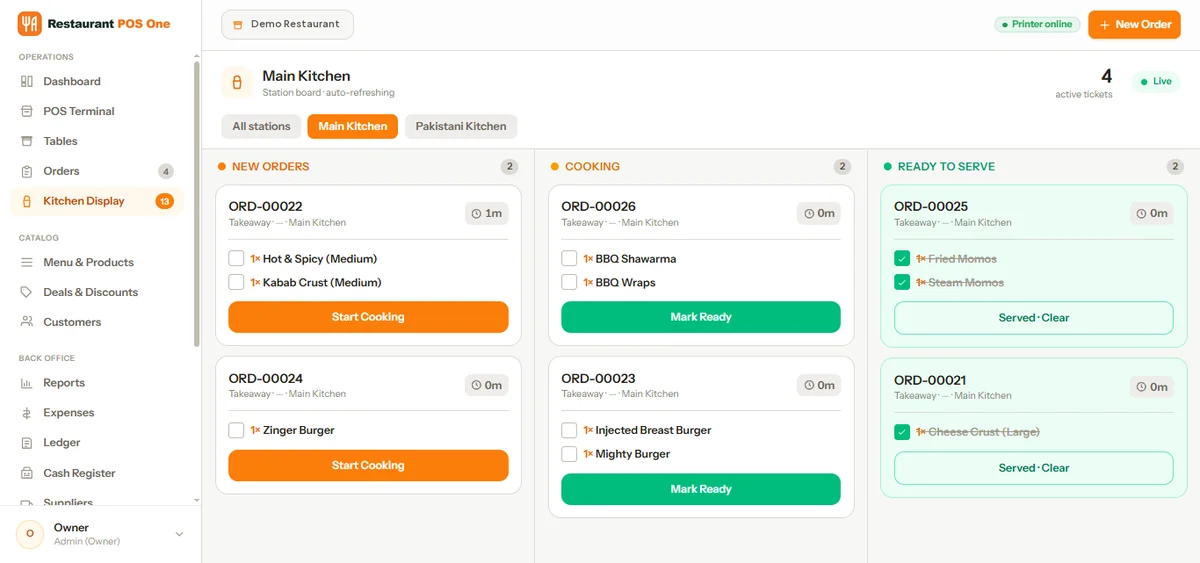
Restaurant POS One is built around the workflow of a small kitchen rather than a payments business. An order comes in as dine-in, takeaway or delivery. It goes to the kitchen as a printed ticket or onto a kitchen display, where the team moves it from new to cooking to ready. The bill is printed and the payment recorded, and at the end of the day the cash register is reconciled against the shift.
What makes it different for a small operator is how much back-office work sits in the same app:
- Inventory, units, recipes, purchases and supplier records alongside sales, so food cost and stock aren’t in a separate spreadsheet.
- Eight staff roles (admin, manager, cashier, waiter, rider, kitchen, HR and accountant), with PIN sign-in on shared devices, so a waiter can’t see the ledger and a cashier can’t see payroll.
- Rider assignment for your own delivery orders, useful if you run your own drivers rather than relying only on delivery apps.
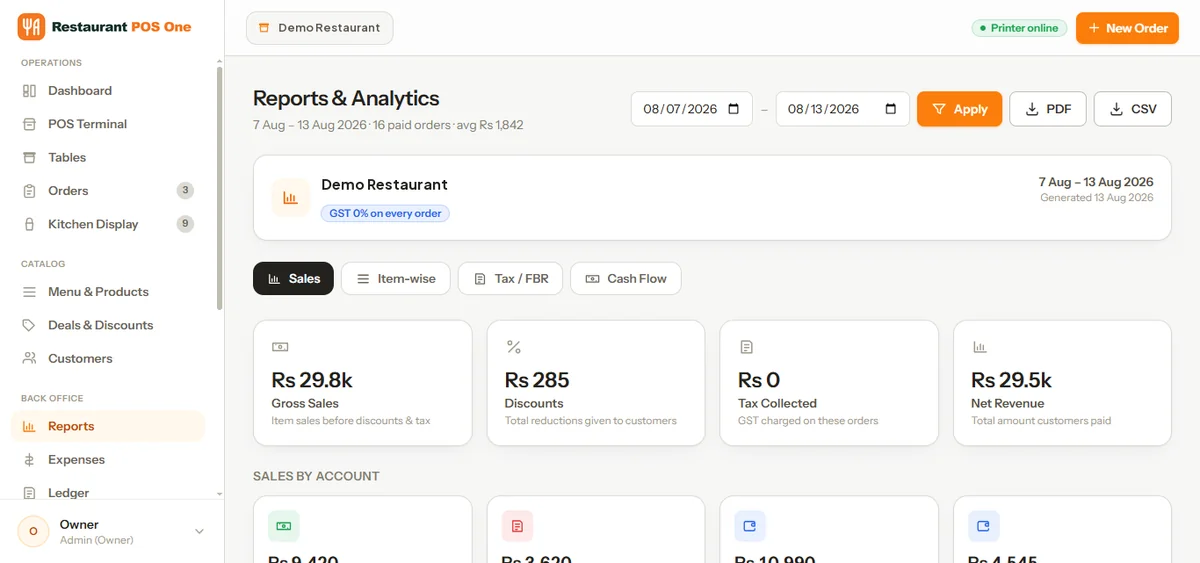
- Reports on sales, item results, tax and cash flow for any date range, downloadable as PDF or CSV.
- Runs in a browser on a desktop, tablet or phone, so you can start on devices you already have.
Choose something else if: you need integrated card processing with a US processor confirmed today, offline mode, or a large third-party app marketplace. Restaurant POS One records card payments taken on your own card machine but doesn’t process them, and it doesn’t run offline. It’s also a newer product without years of public reviews behind it.
Compare Restaurant POS One against your current setup. Bring a real order from last Friday and we’ll run it through order, kitchen, bill and report.
2. Square — the cheapest way to start, if you don’t need a kitchen screen yet
Square moved to unified plans in October 2025: Free ($0), Plus ($49/month per location) and Premium ($149/month per location), with in-person rates of 2.6%, 2.5% and 2.4% + 15¢ respectively, according to Square’s pricing announcement and its fees page. There’s no long-term contract.
The catch for restaurants is the kitchen display. It isn’t available on Square Free. On Plus it costs $30 per device per month, and on Premium $20, per Square’s restaurant pricing page. A café with one counter and a printed ticket can run on Free indefinitely. A restaurant with a grill station and a cold station pays for two screens.
Best for: counter-service cafés, takeaways, food trucks and first-time owners who want to start this week. Watch for: feature gaps on Free that push you onto Plus as soon as the kitchen gets busy. If you’re already on Square and weighing whether to leave, our Square alternatives comparison covers fund holds and processor lock-in.
3. Toast — built for busy service, with payments tied in
Toast’s Point of Sale plan is $69/month with flat-rate processing of 2.49% + 15¢ in person. The Starter Kit plan has $0 hardware and no monthly software fee, but you pay a flat processing rate on every transaction instead. Third-party comparisons such as Katalyst’s report it at 2.99% + 15¢. Toast Payments is required on both.
Toast’s strength is hardware and service flow made for restaurants: handhelds for ordering at the table, coursing, modifiers and kitchen routing. The trade-off is that you can’t bring your own processor, so the payment rate matters as much as the plan price.
Best for: full-service and busy quick-service restaurants that expect to grow and value restaurant-grade hardware. Watch for: the Starter Kit’s higher processing rate at volume. Ask for the rate in writing and run it through the table above.
Already on Toast and thinking about leaving? Our Toast alternatives comparison covers contract terms and hardware write-off costs this list doesn’t get into.
4. SpotOn — pick your trade-off: monthly fee or contract
SpotOn’s pricing page gives you a clear choice:
- All-In: $0/station, 2.79% + 20¢ in person, 2-year minimum term with processing minimums, hardware included.
- POS Essentials: $55/station, 2.45% + 15¢, month-to-month, and you buy hardware (a Station 15 is listed at $750, a handheld at $297).
For most small restaurants that can afford the hardware upfront, Essentials is the cheaper option over two years. The worked example above shows why.
Best for: table-service restaurants that want included hardware and support, and can accept a term. Watch for: the processing minimums on All-In if you have a slow season.
5. Loyverse — genuinely free core, pay only for what you add
Loyverse’s point of sale, kitchen display, customer display, loyalty and multi-store management are free. You pay for add-ons: advanced inventory $25/month per store, employee management $5/month per employee and unlimited sales history $5/month per store. Without that last one, analytics cover 31 days. Card processing goes through a third-party provider you pick.
It’s the only system here with a kitchen display on a $0 plan.
Best for: very small cafés, kiosks and takeaways running on their own tablets. Watch for: limited table-service depth and no built-in processing, so you negotiate that separately.
6. TouchBistro — iPad table service with staff tools included
TouchBistro’s Point of Sale plan starts at $69/month and includes menu management, floor plans, staff management, reporting and 24/7 support, but you buy hardware separately. The Essentials Bundle starts at $119/month and adds integrated payments and restaurant hardware. Processing rates aren’t published, so you get them in a quote.
Best for: table-service restaurants that like iPads and want staff scheduling in the POS. Watch for: unpublished processing rates. Get them in writing before comparing.
7. Lightspeed Restaurant — only worth it once you need the Essential tier
Lightspeed’s Starter plan is $69/month, Essential $189/month and Premium $399/month. A kitchen display costs $30 per screen per month on every plan. The features small restaurants usually want Lightspeed for, advanced inventory management and multi-location management, start at Essential, not Starter.
That puts a Lightspeed setup with advanced inventory and one kitchen screen at about $219/month before processing. Owner discussions summarised by Merchants Bancard warn that it can feel complex and expensive for smaller cafés and quick-service spots.
Best for: restaurants with a second site or complex inventory on the horizon. Watch for: paying $69 for Starter and finding the feature you wanted is in Essential.
8. Clover — best if you’ll buy through your bank
Clover is sold both directly and through banks and resellers, so the same hardware can come with different processing terms. Clover’s restaurant plans are Starter, Standard and Advanced. Independent reviews put bundled hardware and software at about $135/month on a 36-month term, or hardware upfront from about $1,699 plus $89.95/month in software, according to Tech.co. Clover’s own pricing page didn’t display plan prices when we checked, so confirm these figures with your seller.
Best for: cafés and delis that sell retail goods alongside food, and owners with an existing bank relationship. Watch for: 36-month terms, and reseller pricing that differs from Clover’s own.
Also considered, and why they’re not in the top 8
| System | Why not |
|---|---|
| Revel Systems | Quote-only; built for larger and multi-unit operators |
| Epos Now | Hardware-bundle pricing that needs a support plan; stronger in the UK than the US |
| SkyTab (Shift4) | Sold through reps; we couldn’t verify current pricing on SkyTab’s own site |
| NCR Voyix (Aloha) | Enterprise-focused; overkill for one site |
| Heartland Restaurant | Quote-based; processor-led sale |
| Owner.com | Online ordering and marketing, not an in-house POS |
What to test in any demo, whichever system you pick
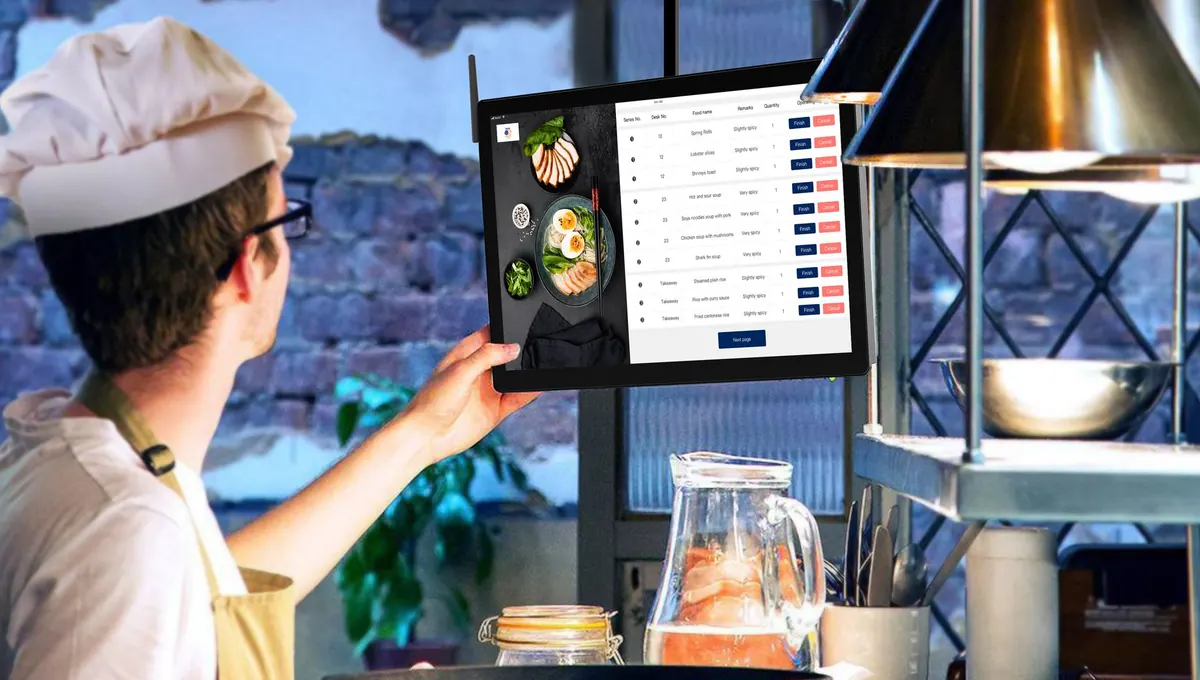
Sales demos show the happy path. Ask to see these instead:
- A modified order on a busy night, e.g. “burger, no onion, add cheese, sauce on the side, split between two guests”. Check how it prints on the kitchen ticket.
- An item going out of stock mid-service. How fast can you disable it, and does online ordering update too?
- A void and a discount. Who can do each, and does it show up in the day’s report with a name and reason?
- The end-of-day cash-up. Count the drawer, then find the variance report.
- Exporting last month’s item sales. Can you get a CSV without calling support?
- The processing rate, in writing, including keyed-in, Amex and per-transaction fees.
Our guide to choosing a restaurant POS shows how to run one test order through all six in a single demo and compare vendors on the same terms.
How we chose
We started with 14 systems that appear in current US search results and in small-restaurant owner discussions. We dropped the six above for being enterprise-focused, quote-only with no published starting point, or not a POS. Pricing and plan details come from each vendor’s own pricing or help pages, checked on 29 September 2026, except Clover as noted. We didn’t run hands-on tests of competitor systems, and we don’t claim to have done so. POS pricing changes often, so check the vendor’s page before you sign.
Running a small restaurant and weighing these up? Compare Restaurant POS One side by side with the system you’re considering. Bring your menu and a real order, and we’ll show you the full order → kitchen → bill → report flow.
See how your own orders would work.
Bring an example order, the changes customers request and the devices you plan to use.
Book a product demo →