
Best POS Systems for Bakeries (2026): Picked for Recipe Costing, Not Just Checkout
8 bakery POS systems compared on what actually protects your margin: ingredient-level recipe costing, retail and wholesale handling, and real 2026 pricing.
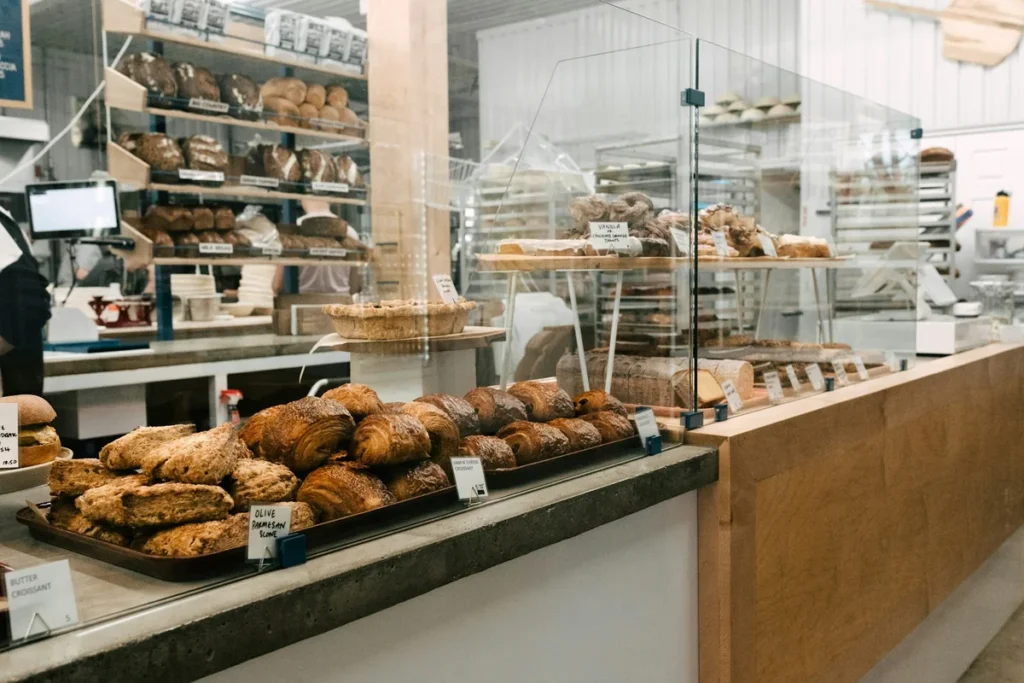
The best bakery POS isn’t the one with the nicest till screen. It’s the one that catches margin loss before it happens: when butter, flour or eggs go up and your $4.50 croissant quietly stops making money. That means ingredient-level recipe costing, not just a checkout screen. Square and Loyverse are the cheapest to start. KORONA and Lightspeed go deepest on inventory. CAKE and Toast suit a busier counter. And if you want menu setup, counter billing, a kitchen ticket and inventory, recipes and suppliers in one simple app, that’s Restaurant POS One, ranked first below, with the gaps it still has.
Pricing is from each vendor’s own site, checked 3 October 2026.
Start here: which one fits your bakery?
| If your bakery is… | Look at first | Why |
|---|---|---|
| Counter-only, tight budget | Square Free, Loyverse | $0 software; pay only processing |
| Selling bread/pastries plus packaged retail goods | KORONA POS, Clover | Barcode and retail inventory depth |
| Watching ingredient costs closely (butter, flour, eggs) | Restaurant POS One, KORONA POS | Recipe and purchase records tied to sales |
| Also running a café counter alongside the bakery | Restaurant POS One, CAKE POS | Counter-to-table order handling, not just retail checkout |
| Taking custom cake/catering orders | CAKE POS, Toast | Order-ahead and tableside-style order management |
| Planning a second location | Lightspeed, Toast | Multi-location management on higher tiers |
If you also run a café-style counter, our café POS comparison covers the till-speed and loyalty side in more depth.
Why recipe costing matters more here than a processing-fee table
Café and restaurant POS comparisons usually lead with transaction fees. For a bakery, the bigger risk is invisible: ingredient prices move, and your menu price doesn’t. Take a pastry priced at $4.50 with a recipe costed at 28% food cost when butter is $3.80/lb. If butter rises to $4.60/lb, that same pastry quietly becomes 34% food cost, and nobody adjusts the price because nothing on the till screen flagged it. A POS that ties recipes to live purchase prices catches this. One that only tracks sales doesn’t.
This is the lens we used to judge the eight systems below, not a processing-rate comparison. Processing fees still matter, but they’re page two of the bakery math, not page one.
The 8 best POS systems for bakeries
1. Restaurant POS One — menu, counter, kitchen ticket and recipes in one app
Pricing: from $49/month (illustrative; final pricing confirmed in your demo).
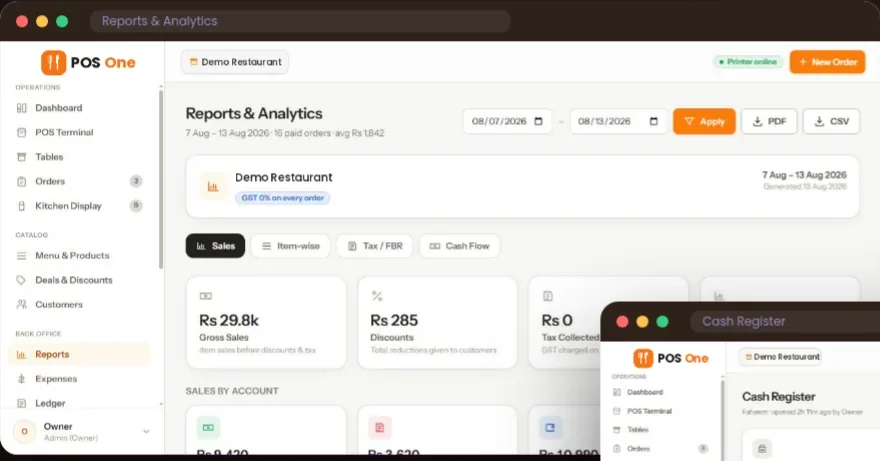
Set up your bakery menu as items, categories and bundles, with deals showing their price and savings right at the counter. Orders go to a kitchen ticket or station display for prepared items, and dine-in or takeaway both work from the same screen. Inventory, recipes, purchases and supplier records sit in the same app as sales, so you’re not reconciling a separate spreadsheet to know your food cost.
- Eight staff roles with PIN sign-in, useful for a bakery with early-morning prep staff and separate counter staff.
- Sales, item and register reports, exportable as PDF or CSV, for tracking margin over time.
- Runs in a browser on hardware you already have.
Choose something else if: you need weighing-scale integration, batch production forecasting, expiry-date tracking, online pre-orders, or delivery integrations. None of these are confirmed in the current product, and for a production-heavy bakery they may matter more than anything else on this list. Ask directly in a demo before committing.
See the bakery workflow or book a demo with your actual recipe list and we’ll show you the costing side alongside the till.
2. Square — the simplest free start for a counter-only bakery
Square’s plans are Free ($0), Plus ($49/month) and Premium ($149/month), with in-person rates of 2.6%, 2.5% and 2.4% + 15¢. A kitchen display is $30/device on Plus, $20 on Premium, and not available on Free.
Square’s inventory tools are built for retail counting, not recipe-level ingredient costing. It tracks what you sold, not what a croissant actually cost to make.
Best for: small counter-only bakeries that want to start today with no commitment. Watch for: no built-in recipe costing. You’ll need a separate system or spreadsheet to track ingredient cost per item.
3. KORONA POS — the deepest retail and inventory side on this list
KORONA sells three retail tiers per terminal: Core $59/month, Retail $79/month (adds full inventory and supplier tools), Plus $99/month (advanced stock control and analytics). A food-service add-on, KORONA Food, starts at $10/terminal/month. You choose your own payment processor separately, and plans are month-to-month.
Of everything here, KORONA’s inventory depth is built closest to what a production bakery actually needs: per-item stock tracking, supplier management and barcode handling, inherited from its retail roots rather than bolted onto a restaurant till.
Best for: bakeries selling a lot of packaged retail goods (loaves, jars, gift boxes) alongside the counter. Watch for: you’re choosing and managing your own processor, which is more setup work than an all-in-one plan.
4. CAKE POS — built for a busy counter with custom and tableside orders
CAKE (by Mad Mobile) starts at $69/month, with tableside-style ordering, online ordering and real-time reporting included. It’s positioned for small to mid-sized bakeries and cafés rather than pure production bakeries.
We couldn’t independently verify CAKE’s pricing page directly; the figure above comes from secondary pricing trackers, so confirm current plans with CAKE before comparing.
Best for: a bakery-café hybrid taking both counter orders and custom cake orders. Watch for: confirm the current price and what’s included directly with CAKE; our figure is from a secondary source.
5. Toast — restaurant-grade hardware, useful with a real kitchen line
Toast’s Point of Sale plan is $69/month with 2.49% + 15¢ processing. The Starter Kit drops upfront costs in exchange for a higher flat rate (around 2.99% + 15¢ by third-party reports). Toast Payments is required either way.
Toast fits a bakery that’s really a bakery-restaurant hybrid, with made-to-order sandwiches or a breakfast menu alongside the pastry case, rather than a pure retail bake shop.
Best for: bakery-cafés with a real kitchen line, not just a counter. Watch for: you can’t bring your own processor, so the rate matters as much as the plan price.
6. Lightspeed Retail — the other deep-inventory option, with room to grow

Lightspeed’s Starter plan is $69/month, Essential $189/month, Premium $399/month, with a kitchen display at $30/screen on every tier. Advanced inventory management, the feature a bakery usually wants most, only starts at Essential.
That puts a realistic Lightspeed setup for a bakery at roughly $219/month before processing, which only pays off once the inventory and multi-location tools are doing real work.
Best for: bakeries planning a second location or with complex multi-ingredient inventory. Watch for: paying for Starter and finding the inventory feature you wanted is gated to Essential.
7. Clover — strong retail checkout, lower processing rate if you buy it right
Clover’s in-person rate is 2.3% + 10¢ for restaurant-coded merchants, 2.5% + 10¢ for retail standard/advanced. Bundled hardware and software run about $135/month on a 36-month term, or roughly $1,699 upfront plus $89.95/month. Clover is sold through banks and resellers, so your actual rate can differ a lot from the published one.
Best for: bakeries that also sell retail goods and want barcode-driven checkout. Watch for: reseller pricing. Get your specific contract’s rate in writing.
8. Loyverse — free core, if you’re a very small or home-based bakery
Loyverse’s till, kitchen display, loyalty and multi-store management are free. Paid add-ons: advanced inventory $25/month per store, employee management $5/month per employee, unlimited sales history $5/month per store. Card processing goes through a third-party provider you pick.
Its inventory is stock-counting, not recipe-level ingredient costing, so it suits a bakery that reorders by “how many loaves are left” rather than one tracking food cost percentage per item.
Best for: very small or home-based bakeries on a tight budget. Watch for: no recipe costing, and you negotiate processing separately.
Also considered, and why they’re not in the top 8
| System | Why not |
|---|---|
| SpotOn | Till-speed and staff-management focus suits a café counter more than bakery production; see our café comparison |
| SumUp | Same as SpotOn — stronger fit for a fast counter than for recipe-heavy bakery production |
| TouchBistro | Leans table-service; covered in our small-restaurant comparison |
| Epos Now | Hardware-bundle pricing that needs a support plan; stronger in the UK than the US |
| Revel Systems | Quote-only; built for larger and multi-unit operators |
| NCR Voyix (Aloha) | Enterprise-focused; overkill for one bakery |
| Heartland Restaurant | Quote-based; processor-led sale |
| Owner.com | Online ordering and marketing, not an in-house POS |
What to test in any demo, whichever system you pick
- Enter a real recipe (e.g. a loaf with flour, water, yeast, salt quantities) and check if the system shows cost per unit, and whether it updates when a purchase price changes.
- A custom order, like a wedding cake with a deposit and a pickup date. Does the system handle it, or do you need a separate booking tool?
- An item going out of stock mid-morning. How fast can you pull it from the counter display?
- The end-of-day cash-up and a sales-by-item export, so you can see your best-sellers without calling support.
- The processing rate in writing, specifically for your merchant category and keyed-in rate.
Our guide to choosing a restaurant POS covers running one order through a full demo checklist if you want the longer version.
How we chose
We started with 9 systems that appear in current US bakery-POS search results. We dropped one that leans more café-counter (covered separately in our café comparison) and kept the retail-inventory-strong and bakery-production-relevant options. Pricing and plan details come from each vendor’s own pricing or help pages, checked on 3 October 2026, except CAKE POS, which is from secondary sources as noted. We didn’t run hands-on tests of competitor systems, and we don’t claim to have done so. Get your actual processing rate and plan details in writing before you sign.
Running a bakery and weighing these up? See the bakery workflow or book a demo with your real recipe list, and we’ll show you the costing, the counter and the reports side by side with what you’re using now.
See how your own orders would work.
Bring an example order, the changes customers request and the devices you plan to use.
Book a product demo →