
How Much Does a Restaurant POS System Cost? Real Monthly and First-Year Numbers (2026)
What a restaurant POS really costs in 2026: software, hardware and card processing worked out for a café, a 40-cover restaurant and a takeaway, plus a free cost calculator.
A restaurant POS system usually costs $0–$150 a month in software per location, $0–$2,000 or more upfront in hardware, and 2.4–2.8% plus 15–20¢ on every card payment. That last part is the one that matters. For a small restaurant taking $15,000–$50,000 a month on cards, processing comes to roughly $650–$1,900 a month, around 90% of the running cost. On the mainstream plans, a year of running costs typically lands between $8,000 and $25,000, and card volume decides most of that.
The ranges above are what most pricing guides stop at. Below, we work out real numbers for three restaurant types, show where the break-even points between plans sit, and list the charges that don’t appear on pricing pages. All vendor prices come from each company’s own US website and were checked on 30 September 2026.
Work out your own number
Enter your figures to compare monthly running costs on six plans with published US rates. Use card sales only. Cash payments don’t attract processing fees.
| Plan | Software | Processing | Per month | First year* |
|---|
If you’d rather talk it through, we’ll price Restaurant POS One for your restaurant using the same inputs.
Three restaurants, three first-year bills
Here’s what the calculator gives for three typical small restaurants. Hardware is covered separately below.
Counter café
$15,000 a month in card sales, $8 average ticket (1,875 transactions), one till, printed kitchen tickets.
| Plan | Per month | First year (running) |
|---|---|---|
| Square Free | $671 | $8,055 |
| SpotOn POS Essentials | $704 | $8,445 |
| Square Plus | $705 | $8,463 |
| Toast Point of Sale plan | $724 | $8,685 |
| Square Premium | $790 | $9,483 |
| SpotOn All-In | $794 | $9,522 |
40-cover table-service restaurant
$30,000 a month, $30 ticket (1,000 transactions), a till plus a handheld, one kitchen screen.
| Plan | Per month | First year (running) |
|---|---|---|
| Square Free (no kitchen display) | $930 | $11,160 |
| Toast Point of Sale plan + KDS quote | $966 | $11,592 + KDS |
| Square Plus | $979 | $11,748 |
| SpotOn POS Essentials + KDS quote | $995 | $11,940 + KDS |
| SpotOn All-In + KDS quote | $1,037 | $12,444 + KDS |
| Square Premium | $1,039 | $12,468 |
Busy takeaway
$50,000 a month, $15 ticket (3,333 transactions), two tills, two kitchen screens.
| Plan | Per month | First year (running) |
|---|---|---|
| Square Free (no kitchen display) | $1,800 | $21,600 |
| Toast Point of Sale plan + KDS quote | $1,814 | $21,768 + KDS |
| SpotOn POS Essentials + KDS quote | $1,835 | $22,020 + KDS |
| Square Plus | $1,859 | $22,308 |
| Square Premium | $1,889 | $22,668 |
| SpotOn All-In + KDS quote | $2,062 | $24,740 + KDS |
Two things stand out. Within each restaurant, the gap between the cheapest and dearest mainstream plan is only 12–18%, less than most owners expect. And the order barely changes, because every plan is mostly the same thing: a percentage of your card sales.
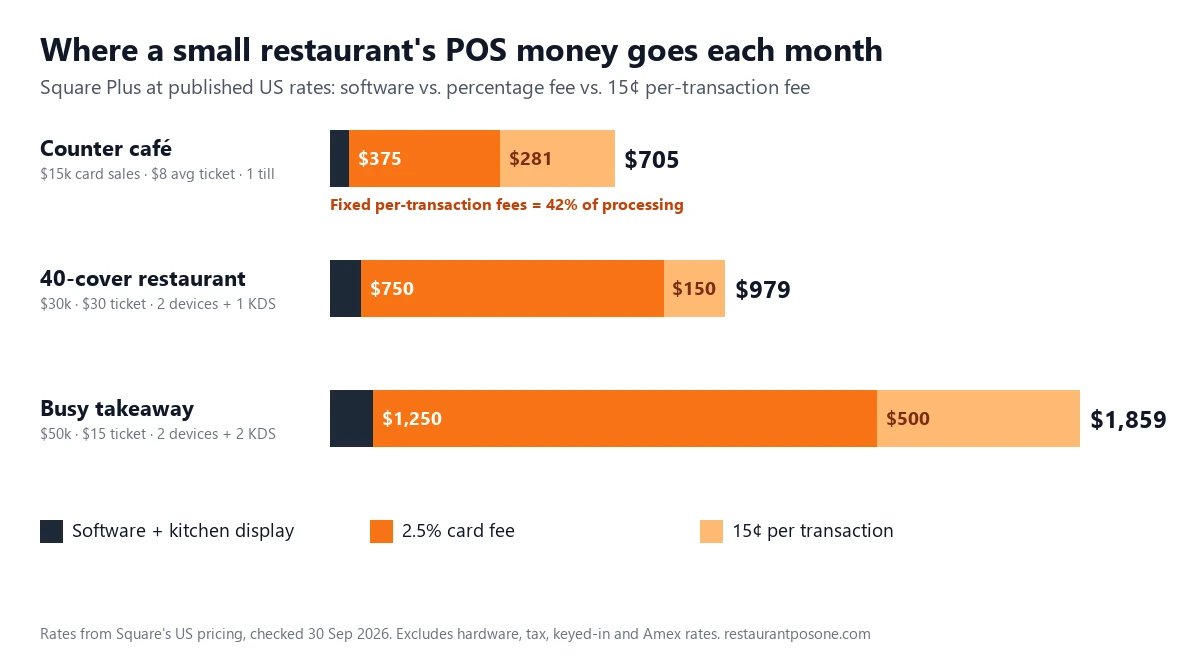
The café row shows a cost most guides miss. With an $8 ticket, the fixed 15¢ fee adds almost two percentage points to every sale, and it makes up 42% of the café’s processing bill. If your average ticket is under $10, the per-transaction fee is worth more attention than the headline percentage. Our café POS comparison runs this same math across eight vendors at a $6 ticket, where the gap between a 10¢ and a 20¢ fixed fee swings the monthly total by close to $100.
The break-even points that decide the cheapest plan
Paid plans buy you a lower processing rate. Whether that’s worth it depends only on your card volume:
- Square Plus beats Square Free above about $49,000 a month in card sales. The $49 subscription saves 0.1%, which is $49 at exactly that volume. Below it, Free is cheaper unless you need Plus features such as a kitchen display.
- Square Premium beats Plus above about $100,000 a month, and beats Free above about $74,500. Few single-site small restaurants reach that.
- SpotOn POS Essentials beats the $0 All-In plan at modest volumes. Per station, Essentials is cheaper once that station takes about $5,700 a month with an $8 ticket, $8,200 with a $15 ticket, or $10,900 with a $30 ticket. Most busy tills pass that in a couple of weeks, and Essentials is month-to-month, while All-In carries a two-year term with processing minimums.
- Toast’s Point of Sale plan and Square Plus are within about $20 a month of each other at every volume above. Choose between them on hardware, workflow and kitchen display pricing, not on the headline price.
If your volume sits near a break-even line, check again after your busiest season. Changing plan on Square is straightforward because there’s no contract.
Hardware: what you’ll actually pay upfront
| Item | Published price | Notes |
|---|---|---|
| Square Register (2nd gen) | $899 | Or $44/month over 24 months |
| Square Handheld | $399 | Or $37/month over 12 months |
| Square Terminal | $299 | Card reader with a built-in screen and printer |
| Square Stand | $149 | You supply the iPad |
| SpotOn Station 15 | $750 | Listed as reduced from $995 |
| SpotOn handheld | $297 | Listed as reduced from $495 |
| Toast Starter Kit | $0 first device | Higher processing rate; extra devices and all other Toast hardware are quoted, not published |
| Kitchen printer | about $200–$400 | Independent estimates (Merchant Maverick) |
| Kitchen display screen | about $200–$1,500 | A tablet at the low end, a commercial screen at the high end |
A realistic first-year hardware spend for the 40-cover example above, a till, a handheld, a kitchen screen and a printer, is about $1,700–$2,100 with Square, or a $0 starter device plus quoted extras with Toast. Add that to the running costs in the tables to get a true year-one total.
Costs that don’t appear on the pricing page
These are the charges owners most often find after signing:
- Kitchen display subscriptions. Square charges $30 a month per screen on Plus and $20 on Premium. Lightspeed charges $30 per screen on every plan. Two screens on Lightspeed add $720 a year.
- Keyed-in and Amex rates. SpotOn’s published keyed-in rate is 3.79% + 20¢ on All-In and 3.45% + 15¢ on Essentials, and Amex on Essentials is 3.19% + 15¢. Phone orders and a high Amex share can push your effective rate well above the headline.
- Contracts and minimums. SpotOn All-In has a two-year minimum with processing minimums. Clover hardware is commonly sold on 36-month bundles through banks and resellers. Toast requires Toast Payments on all plans.
- Paid add-ons on “free” plans. Loyverse is free at its core, but advanced inventory is $25 a month per store, employee management $5 per employee, and sales history beyond 31 days $5 per store.
- Unpublished rates. TouchBistro and Lightspeed don’t publish processing rates, and Toast and SpotOn don’t publish kitchen display pricing. Ask for all of it in writing before you compare.
- Setup and menu entry. Some vendors charge for installation, menu building or on-site training. Ask whether it’s included.
Our guide on how to choose a restaurant POS has the full list of cost questions to put to a vendor in a demo.
Know your card share before comparing rates
Processing only applies to card payments, so your real POS cost depends on how customers pay. A restaurant taking 30% of sales in cash pays processing on 70% of its revenue, not all of it. Before plugging numbers into the calculator, pull a month of takings by payment method from your current till.
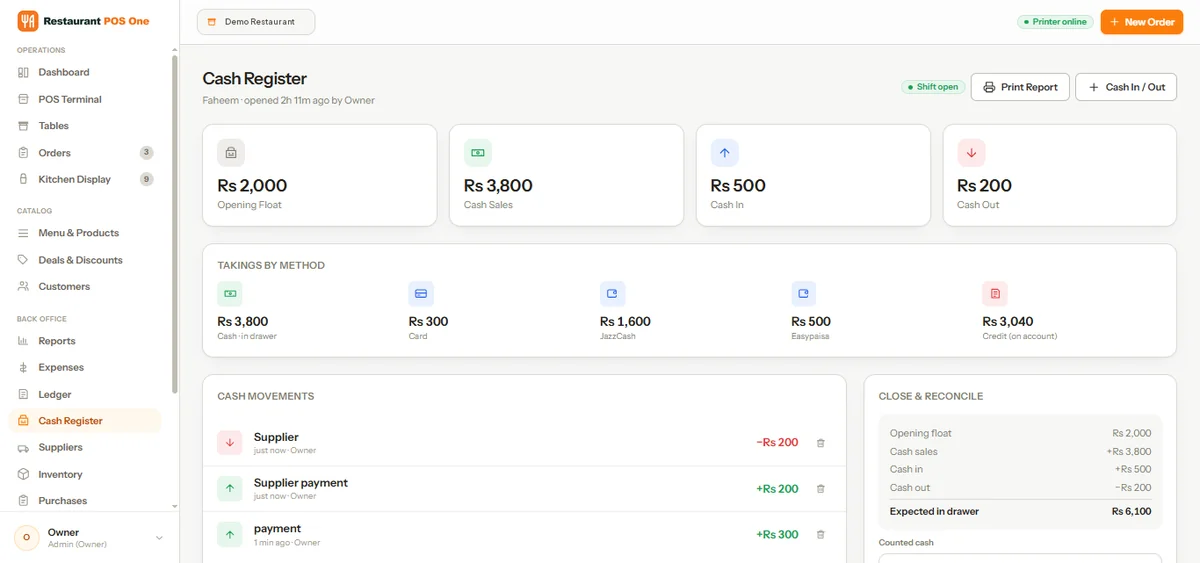
In Restaurant POS One, the cash register screen splits each shift’s takings by method (cash, card, digital wallets and customer credit), alongside the opening float, cash in and out, and the expected cash in the drawer. A week of those shift reports gives you the card figure to use, and the same numbers help you check a new vendor’s processing statements later.
Can you avoid buying new hardware and paying per kitchen screen?
Often, yes. A browser-based POS runs on the tablets, laptops and phones you already own, and some plans include the kitchen display instead of charging for each screen. That removes two of the costs above: most of the upfront terminal spend, and the $20–$30 a month that Square and Lightspeed charge per kitchen screen.
Loyverse, for example, includes its kitchen display free. Restaurant POS One runs in any browser on a desktop, tablet or phone, and its illustrative $49 a month plan covers ordering, kitchen display and tickets, table plans, menus, inventory and reports. For a restaurant running three kitchen screens, the per-screen fees alone would add up to $720–$1,080 a year on the plans above.
Before you switch to any browser-based system, check three things:
- Printers: will your receipt and kitchen printers work with it, or do you need new ones?
- Card payments: which processor does it use in your country, and at what rate? With Restaurant POS One, printers and payment processing are confirmed with you in the demo.
- Internet drops: what happens to orders and payments if the connection goes during service? Ask every vendor this, and ask them to show you rather than tell you.
If you’re still comparing brands, our breakdown of the best POS systems for small restaurants shows who each one suits.
How to cut your POS bill
- Use your real card figure. Leave out cash, and check your average card ticket, not your average spend.
- Price the kitchen screens. Count every station that needs one and get the monthly fee per screen in writing.
- Match the plan to your volume. Use the break-even points above, and re-check after your busy season.
- Avoid long terms at high volume. A $0 plan with a higher rate gets more expensive the more you sell.
- Watch keyed-in and Amex share. If phone orders are a big part of your trade, ask for the keyed-in rate first.
- Ask what’s not on the page. Setup, menu entry, training, extra devices and support tiers.
Processing rates in this article come from each vendor’s pricing page, including Square’s published fees. Rates change, so check each one before you sign.
Want an exact number for your restaurant? Get pricing for your restaurant. Bring last month’s card takings and your device list, and we’ll cost Restaurant POS One side by side with your current setup.
See how your own orders would work.
Bring an example order, the changes customers request and the devices you plan to use.
Book a product demo →